See everything you own, including what no app can link.
For investors whose wealth spans brokerages, a house, a safe and a spreadsheet. Stocks, crypto, cash, gold, real estate. Import once from a screenshot, then update it by talking. A daily briefing tells you what moved and what's coming up. No bank or brokerage logins required.
- No bank or brokerage logins
- Photos read once, then discarded
- Nothing charged until day 31
- Cancel anytime
Four steps. No logins.
Set it up once, then just talk to it.
Snap a screenshot
Photo, screenshot or CSV. Photos are read once, then discarded.
Just tell it what changed
Say it or type it: “I sold 20 shares of Apple and the cash went to my Robinhood cash account.” Buy, sell, add cash, take cash out. The Oracle works out the changes and shows you, and nothing updates until you confirm. No forms, no spreadsheet.
Stop scouring the market
Every day you get a briefing about your own holdings: what moved, why, and what's coming up, like earnings calls and big data releases such as the jobs report, plus a look at the week ahead. Open one email and you're caught up.
Navigator: morning briefing. Command Center: morning, midday and end of day.
One vault, whole household
Add a partner's or family member's accounts. Everything rolls into one total.
This is what you get
The real interface, shown with sample holdings. Home and holdings, signals, adding assets, and your daily dispatch.
Active holdings across all your accounts.
STOCKS3 SignalsVAULT VALUE $93,090.00 +$35,178 (+60.7%)
| ACCOUNT | ASSET | QTY | BUY PRICE | LIVE PRICE | VALUE | DAILY P&L | TOTAL P&L |
|---|---|---|---|---|---|---|---|
| FIDELITY | NvidiaNVDA | 42 | $412.00 | $891.00 | $37,422.00 | +$611.10+1.66% | +$20,118.00+116.26% |
| SCHWAB | MicrosoftMSFT | 88 | $301.50 | $412.00 | $36,256.00 | +$298.40+0.83% | +$9,724.00+36.65% |
| ROBINHOOD | AppleAAPL | 92 | $153.00 | $211.00 | $19,412.00 | −$96.82−0.50% | +$5,336.00+37.91% |
CRYPTO3 SignalsVAULT VALUE $16,227.00 +$5,702 (+54.2%)
| ACCOUNT | ASSET | QTY | BUY PRICE | LIVE PRICE | VALUE | DAILY P&L | TOTAL P&L |
|---|---|---|---|---|---|---|---|
| COINBASE | EthereumETH | 4.2 | $1,900.00 | $2,760.00 | $11,592.00 | +$126.90+1.11% | +$3,612.00+45.26% |
| COINBASE | XRPXRP | 2,500 | $0.85 | $1.59 | $3,975.00 | +$18.76+0.47% | +$1,850.00+87.06% |
| COINBASE | StellarXLM | 3,000 | $0.14 | $0.22 | $660.00 | −$11.20−1.67% | +$240.00+57.14% |
COMMODITIES2 holdingsVAULT VALUE $6,560.00 +$1,352 (+26.0%)
| LOCATION | ASSET | WEIGHT | BUY PRICE | SPOT PRICE | VALUE | DAILY P&L | TOTAL P&L |
|---|---|---|---|---|---|---|---|
| HOME SAFE | GoldXAU | 2 oz | $2,100.00 | $2,650.00 | $5,300.00 | +$121.00+2.34% | +$1,100.00+26.19% |
| HOME SAFE | SilverXAG | 42 oz | $24.00 | $30.00 | $1,260.00 | +$36.20+2.96% | +$252.00+25.00% |
REAL ESTATE1 propertyVAULT VALUE $70,000.00
| PROPERTY | GROSS VALUE | MORTGAGE | EQUITY |
|---|---|---|---|
| Primary home | $340,000.00 | −$270,000.00 | $70,000.00 |
CASH4 accountsVAULT VALUE $48,200.00
| ACCOUNT | DESCRIPTION | BALANCE |
|---|---|---|
| Robinhood | Brokerage cash | $30,000.00 |
| Chase | Checking | $12,200.00 |
| PNC | Savings | $4,000.00 |
| Home | Cash on hand | $2,000.00 |
COLLECTIBLES1 itemVAULT VALUE $4,850.00 +$950 (+24.4%)
| ITEM | GRADE | COST BASIS | MANUAL VALUE | GAIN / LOSS |
|---|---|---|---|---|
| Michael Jordan, 1986 Fleer rookie | PSA 6 | $3,900.00 | $4,850.00 | +$950+24.4% |
Sample holdings. Prices for stocks and crypto come from public market data. Everything else is entered by you.
Market intelligence specifically mapped to your holdings.
A supplier mentioned strong demand tied to AI hardware. You hold 42 shares.
SAMPLE SOURCEVIEW
Network activity was in the news today. You hold 4.2 ETH.
SAMPLE SOURCEVIEW
Cloud spending trends were discussed. You hold 88 shares.
SAMPLE SOURCEVIEW
Analyst commentary touched on Apple this week. You hold 92 shares.
SAMPLE SOURCEVIEW
A general market item, tagged low relevance to your holdings.
SAMPLE SOURCEVIEW
Point your camera or drop a screenshot of your portfolio. The Njord engine extracts your holdings into a verified table.
IMAGE IS READ THEN DISCARDED — NEVER STORED.Photo, screenshot, CSV or typed in. No bank or brokerage logins required.
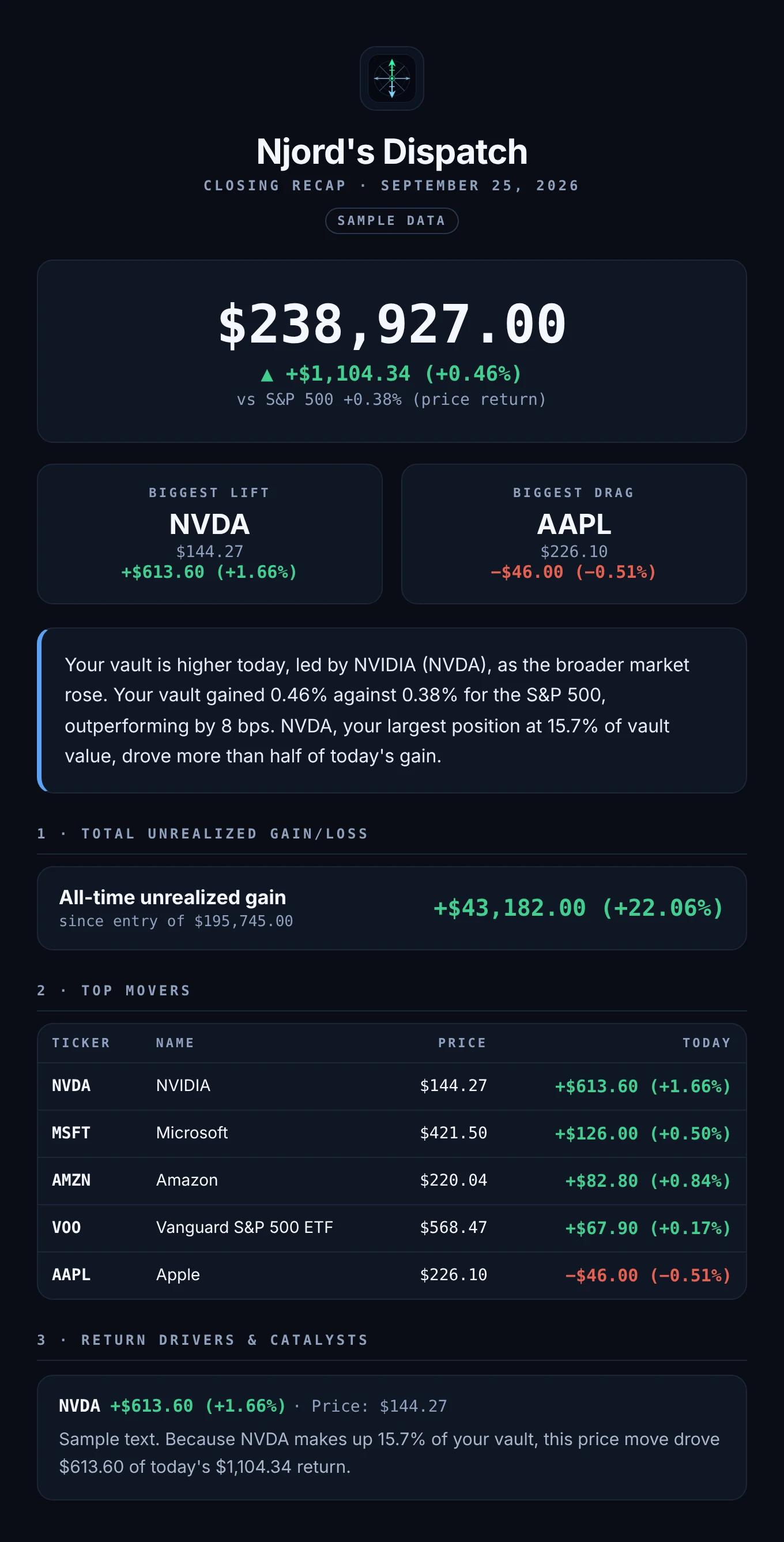
Sample recap. Your vault closed up +$1,104.34 (+0.46%) for a total valuation of $238,927.00. Your 20.2% cash allocation earned yield today, while Nvidia (NVDA) remains your largest position at 15.7% of vault value.
Your vault is higher today, led by NVDA.
Total unrealized gain: +$43,182.00 (+22.06%) since entry of $195,745.00
Sample data shown. Layout and labels match the live app.
Set it up once. Then just talk to it.
No account linking and no credentials. Set it up once, and it keeps up with you.
Your whole portfolio from one screenshot.
Take a photo or screenshot of any brokerage screen, or upload a CSV. It works with Fidelity, Schwab, Merrill, Vanguard and more. Your holdings land in a verified table you can check before saving.
Photos and screenshots are read once, then discarded.
Tell the Oracle what changed. Confirm. Done.
Sold something or moved money? Tell the Oracle by text or voice. It works out exactly what changes, shows you, and nothing updates until you confirm.
Cash, Robinhood: $30,000 → $34,220
Briefings about what you actually own.
Stocks, ETFs and crypto are priced live. You get up to three short briefings a day about what moved in your own holdings, with sources. A house or a card collection uses the value you enter.
Navigator includes the morning briefing. Command Center includes all three.
Your vault closed up +$1,104.34 (+0.46%) at $238,927.00. Nvidia remains your largest position at 15.7% of vault value.
One vault for the whole household.
Add your partner's accounts, a joint account, or a parent's you help keep track of. Give each one a label, and it all rolls into one total, so you both see the full picture without stitching spreadsheets together.
It is one vault under one login, so only add someone's holdings with their okay.
Prefer to type a holding in yourself? Here is how
Most people never need this. Import from a screenshot, or tell the Oracle what you bought or sold and confirm it. Typing it in is for anything a photo can't capture, like cash at home or a private fund.
- Open Add assets. On Home, tap Add assets to vault, then choose to enter it manually.
- Pick the category. Stocks, crypto, commodities, collectibles, real estate, cash or liabilities. Each shows only the fields it needs.
- Enter the holding. For a stock, that is the ticker, shares, buy price or cost basis, and buy date. Live quotes update the value on their own.
- Lock the price if there is no public quote. This is for non-public 401k funds. Your price stays put instead of being overwritten by a market feed.
- Tag the account. Pick the brokerage and add an optional label like Rollover IRA or Joint. It is only a label. We never connect to it.
- Add it. The holding lands in its category and counts toward your total right away. Later, just tell the Oracle when you buy or sell.
Linked apps can't see everything you own.
Cash at home, gold, cards and your house have no account to link. Add them here, next to your brokerage accounts.
| What you hold | Linked apps | Njord's Compass |
|---|---|---|
| Brokerage stocks and ETFs | Login to link | Photo or CSV. No login. |
| Crypto on an exchange | Login to link | Photo or CSV. No login. |
| Cash at home | Can’t link | Add it once |
| Gold or silver in a safe | Can’t link | Add it once |
| Card or collectible collection | Can’t link | Add it once |
| Home value and mortgage | Can’t link | Add it once |
| Connects your bank or brokerage to a third party | Yes | Never |
Comparing by name: Njord's Compass vs Kubera · vs PortfolioGlance · vs Empower
What we store, and what we never ask for.
We keep the holdings you enter so we can track them for you. We do not want your keys.
What we store
- Your name and email from Google sign-in
- The holdings you enter: tickers, quantities, cost basis and account labels
- Your conversations with the Oracle
- Subscription status and the last four digits of your card, through Stripe
What we never ask for
- Bank or brokerage usernames and passwords
- Linked-account access to any institution
- Social Security or government ID numbers
- Full card numbers, and we do not keep your uploaded images
We do not sell your data. Read the full Privacy Policy. Built and run by one person: meet the founder.
What early users say.
Njord's makes managing my finances so much easier by bringing all my personal financial accounts into one convenient platform. I love that I can get a complete picture of my financial health without having to link my bank accounts or share sensitive banking information. Five stars. Love it!
One of my favorite things about the app is how convenient and easy it is to use. I don't have to connect or sync any of my financial accounts. I can simply upload a screenshot of my investments, which makes the process quick and easy while giving me greater peace of mind when it comes to privacy.
I also love the daily briefings! Instead of constantly checking the news and trying to keep up with everything happening in the market, I receive insightful updates that help me understand what's going on and stay informed about trends that could affect my investments. It saves me time and makes investing feel much less overwhelming.
Njord makes it easy to keep tabs on my investments. I can track my whole portfolio in one place and check in on market trends every day, which helps me stay informed without digging through multiple sources. It's a solid tool for anyone who wants a clear, daily view of their finances.
Two plans. Start free for 30 days.
Start with Navigator and try it for 30 days. Move up to Command Center when you want all three daily briefings. Both plans cover your whole household - one vault, one login, everyone's accounts. Other trackers bill per portfolio.
Navigator
- Up to 20 holdings
- Photo, screenshot, CSV and manual import
- Morning briefing every trading day
- Alerts on moves of 2% or more
- 5 Oracle requests a month
- Live prices during market hours
- Concentration and bankruptcy alerts
Command Center
- Everything in Navigator
- Unlimited holdings
- Morning, midday and end-of-day briefings
- Alerts on moves of 1% or more
- Unlimited Oracle requests
- Pre-market and after-hours prices
- Priority signals and support
A full balance-sheet tracker runs $250 a year. Command Center is $180. Navigator starts at $84 - and tracks the house, the safe and the cash too.
Prices in USD. Payments processed by Stripe. Not financial advice.
Before you start
How do I get my holdings in without linking accounts?
Take a photo or screenshot of a brokerage screen, upload a CSV, or type holdings in. Photos and screenshots are read once to pull out the holdings, then discarded.
Do I need a card for the free trial?
Yes. The trial is 30 days, you enter a card to start, and nothing is charged until day 31. Cancel before then and you are not charged.
What do you store?
The holdings you enter, your Oracle conversations, and your name and email from Google sign-in. Payments run through Stripe. We never ask for bank or brokerage usernames or passwords. The Privacy Policy has the full detail.
Does it work for gold, real estate or collectibles?
Yes. Anything you own can be added by hand. Stocks and crypto are priced live. Everything else uses the value you enter, and the Oracle can update it when you tell it what changed.
Can I track my partner's or family's accounts too?
Yes. Add their holdings the same way as yours and label each account, for example "Joint" or a name. Everything counts toward one total value. It is one vault under one login, so only add someone's holdings with their okay.
Is this investment advice?
No. Njord's Compass gives you a clear view of what you own and summaries of market news about your holdings. It does not tell you what to buy or sell, and it is not a registered investment adviser.
Is Njord's Compass right for me?
If you hold only stocks and ETFs at one brokerage and are happy with a free aggregator, you may not need this. This is for wealth spread across accounts and things no app can link.
Your portfolio. Your briefings.
30 days free on Navigator. Nothing charged until day 31.
Start free trialWorks on your phone with no app store. On iPhone: Safari, Share, Add to Home Screen. On Android: Chrome menu, Install app.